Productivity · ship Sep 16, 2026
Project Feed
Project workspace with built-in media review — feed, tasks, docs, canvases, and client portals for design/game/agency teams.
Workspace for game/design/agency teams: living project feed, pinned media review (image/video/audio/PDF/3D/Rive/sprites), tasks linked to feedback, docs, canvases, client portals, chat, time tracking; Free 3 editors / Pro $12/editor/mo (annual) with API/CLI/MCP.
Why on the board
Verified live 2026-09-25 on projectfeed.app (HTTP 200). Product Hunt featured 2026-09-16 (~9d, ~#12 / ~98 upvotes on hunted.space). Productivity lane for creative teams — file review + client portals, not another Marketing agent or Dev CLI. Distinct from Causal (spatial AI canvas), ToneBird (reply assistant), and Design screenshot tools. Free 3-editor plan; Pro $12/editor/mo annual.
What it is
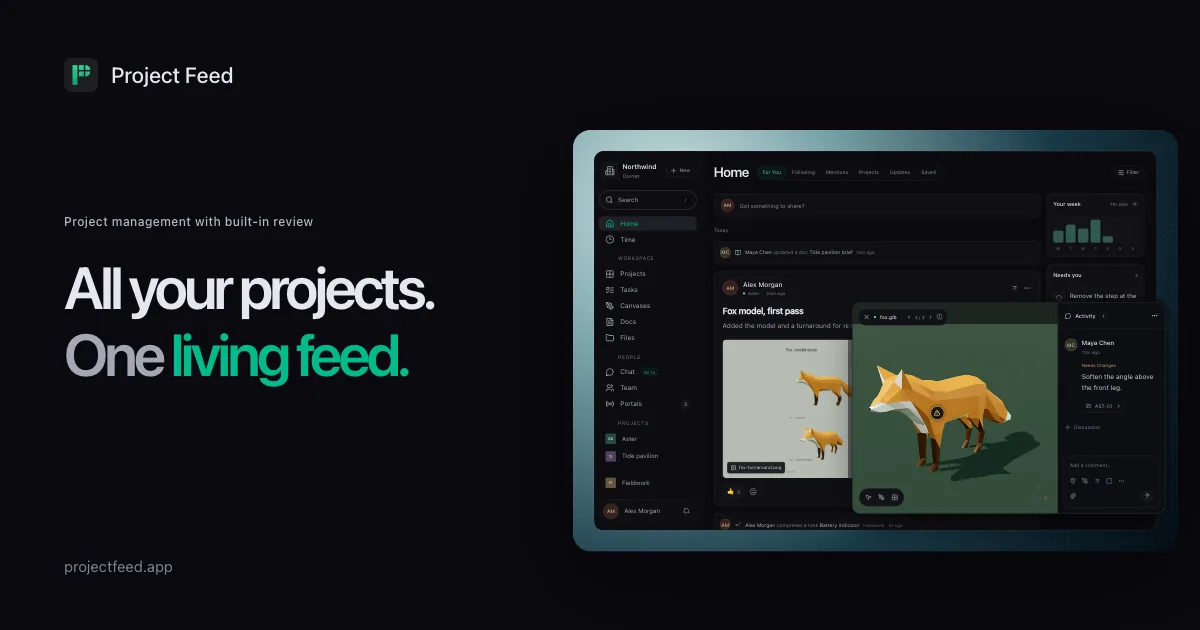
Project Feed (https://projectfeed.app/) is a project workspace built for teams that ship creative work — games, design, and agency deliverables — and need media review in the same place as updates and tasks. We verified the marketing site, features, and pricing pages HTTP 200 on 2026-09-25. The product centers a living feed of posts with attached files: teammates discuss work on the post, then pin feedback on images, video frames, audio ranges, PDFs, 3D models, Rive files, and sprite sheets. A comment can become a task that links back to the exact review, so follow-ups do not lose the visual context. Alongside the feed you get shared docs, infinite canvases for moodboards and flows, chat, time tracking, and analytics. For client work, you publish selected updates to a client portal (email magic link); clients review the version you chose while internal drafts stay private. Pro unlocks integrations (Slack, Discord, GitHub/Jira sync and more per maker notes), plus REST API, CLI, webhooks, and MCP so agents can read requirements and update progress. Pricing verified same day on /pricing (USD): Free $0 — 3 editors, 3 active projects, 5 GB pooled storage, one Project Feed–branded portal, core feed/tasks/docs/canvases/review, basic analytics and read-only API (no card); Pro $12 per editor/month when billed annually ($144/editor/year; monthly toggle available) — unlimited projects and portals without PF branding, 100 GB storage per editor, advanced analytics, full API/CLI/MCP; viewers, guests, and clients are free on every plan. Enterprise is custom (SSO, compliance exports, etc.).
Who it is for
Game studios, product/design teams, and agencies that already bounce between a PM tool, a file share, and a client email thread for approvals. Useful when feedback must sit on a frame, a 3D mesh, or a sprite sheet — not only in a generic comment box — and when clients should see a curated portal rather than your whole workspace. If you only need a personal AI canvas for pre-Figma ideation, look at Causal instead. If you need enterprise ALM or heavy DevOps, this is not a Jira/Linear replacement for software-only orgs; treat it as a creative delivery + review surface that happens to speak API/MCP.
Why we listed it
Fresh public launch: Product Hunt featured Project Feed on 2026-09-16 (~9 days before this listing; ~#12 / ~98 upvotes on hunted.space), live site verified 2026-09-25. Marketing is dense on today’s board (Widgo, Ami AI, Nimply); Billing already has Creem/PaymentKit/tiun/FileFlippers. Productivity gets a maker-built creative-team workspace that is neither a Marketing agent nor a Dev CLI — file review + client portals is a thin niche vs ToneBird (reply assistant) and our Design screenshot/canvas tools (PixelCrew, SeamlessCanvas, Polishory, Causal). Two-person self-funded team per the PH maker comment; Free plan is real (3 editors, no card).
Caveats
We have not run a multi-client portal week, stress-tested 3D/Rive review latency, or connected MCP agents to CI ourselves. Free caps (3 editors / 3 projects / 5 GB / branded portal) and Pro $12/editor/mo (annual) can change — read https://projectfeed.app/pricing and current terms. Early-product risk: whether integrations and MCP stay reliable as workspaces grow, and how well client portals handle large media sets. Name collision risk is low; always link makers to projectfeed.app.
Next step
Try Project Feed
External product site. We write our own notes — we don’t paste vendor marketing.
Open Project Feed →For the maker
Built Project Feed? Add the listed badge
Drop this in your site footer or README so visitors can read our independent notes on your product. Optional and free — a listing never depends on a backlink.

<a href="https://sudoai.net/launches/project-feed/" target="_blank" rel="noopener"><img src="https://sudoai.net/badges/listed-on-sudoai-light.svg" alt="Project Feed — listed on sudoai.net" width="162" height="54" /></a>The badge links to this page. Use it only for products on the board — we don’t hand out rank or “featured” badges.
Notes are original sudoai.net curation for makers. Facts checked against the live product URL on list day; features and pricing change — verify on the vendor site before you buy or integrate.