Our verdict
-
Good fit
Pages is fine for static sites plus a few Functions on the free plan:
Fast direct-upload deploys from the CLI, zero bandwidth charges, and no paid plan required.
-
Free-plan limits
Static requests are free and unlimited:
Functions share the account-wide Workers free quota of 100,000 requests per day and 10 ms CPU time per request.
-
New projects
Cloudflare now points new projects to Workers static assets:
Workers static assets support Cron Triggers, Queues, Workers Logs, and gradual rollouts that Pages lacks.
-
Measured latency
Singapore latency:
Our Singapore curls showed a 48 ms median TTFB for the Pages Function on the local SIN colo, and 48–113 ms for static HTML.
At a glance
- Plan
- Free plan features only; no paid add-ons tested
- Fit
- Static sites plus a few Functions
- Key limit
- Functions: 100,000 requests/day and 10 ms CPU per request (documented, not hit)
- Evidence
- CLI deploy and Singapore latency, Sep 30, 2026
What we actually did
We deployed a test project to Cloudflare Pages using Wrangler 4.145.0 from the command line on the free plan. The fixture contains a minimal HTML page, a custom _headers rule, and one API route in functions/api/hello.js. We also deployed the exact same application as a Cloudflare Worker with Workers static assets to compare the workflow.
sudoai.net itself is deployed to Cloudflare Pages with wrangler pages deploy (direct upload).
The deploy was run from a Linux box in US-East (egress via Cloudflare data center IAD). Latency and edge behavior were measured via sequential HTTP requests from a Mac mini in Singapore (reaching the SIN edge colo).
We did not buy any paid add-on for this test, and paid tiers were not tested. Whether our account holds an active Workers Paid subscription was not verified in this run. All quotas and limits cited below are quoted from official documentation, not hit during our test.
Step by step: CLI deploy on the free plan
Below are the commands from our run. We use the placeholder project name my-test-site below; our actual test run created sudoai-cf-free-test.
1. Check Node.js version
Wrangler 4.145.0 requires Node.js 22 or newer:
node -v
Running npx -y wrangler@latest --version on Node v20.19.2 failed with: Wrangler requires at least Node.js v22.0.0. We switched to Node v22.23.3, which ran Wrangler 4.145.0 cleanly.
2. Initialize package and install Wrangler
Initialize a project folder and install Wrangler locally as a development dependency:
npm init -y
npm install --save-dev wrangler@latest
This installed 38 packages in 3.7 seconds. Installing locally avoids permission issues with global cache folders.
3. Authenticate with Cloudflare
Authenticate interactively in your browser with npx wrangler login, or set the CLOUDFLARE_API_TOKEN environment variable:
export CLOUDFLARE_API_TOKEN="your-api-token"We authenticated using an API token in the environment. Do not commit tokens or account IDs to source control.
4. Create the Pages project
Create the project container with main as the production branch:
npx wrangler pages project create my-test-site --production-branch=main5. Fixture code
Here are the fixture files we deployed:
public/index.html
<!DOCTYPE html>
<html lang="en">
<head>
  <meta charset="UTF-8">
  <meta name="viewport" content="width=device-width, initial-scale=1.0">
  <title>sudoai.net Cloudflare Pages free-tier test</title>
  <style>
    body { font-family: system-ui, -apple-system, sans-serif; margin: 2rem; }
    pre { background: #f4f4f4; padding: 1rem; border-radius: 4px; }
  </style>
</head>
<body>
  <h1>sudoai.net Cloudflare Pages free-tier test</h1>
  <p>This is a throwaway test deployment by the SudoAI Team.</p>
  <pre id="out">Loading...</pre>
  <script>
    fetch('/api/hello')
      .then(res => res.json())
      .then(data => { document.getElementById('out').textContent = JSON.stringify(data, null, 2); })
      .catch(err => { document.getElementById('out').textContent = 'Error: ' + err.message; });
  </script>
</body>
</html>
public/_headers
/*
  X-Robots-Tag: noindex
functions/api/hello.js
export async function onRequestGet(context) {
  const data = {
    ok: true,
    runtime: "pages-functions",
    time: new Date().toISOString(),
    colo: context.request.cf?.colo ?? null,
    country: context.request.cf?.country ?? null,
  };
  return new Response(JSON.stringify(data, null, 2), {
    headers: {
      "content-type": "application/json",
      "cache-control": "no-store",
    },
  });
}
worker/src/index.js
export default {
  async fetch(request, env) {
    const { pathname } = new URL(request.url);
    if (pathname === "/api/hello") {
      const data = {
        ok: true,
        runtime: "workers-static-assets",
        time: new Date().toISOString(),
        colo: request.cf?.colo ?? null,
        country: request.cf?.country ?? null,
      };
      return new Response(JSON.stringify(data, null, 2), {
        headers: {
          "content-type": "application/json",
          "cache-control": "no-store",
        },
      });
    }
    return env.ASSETS.fetch(request);
  },
};
worker/wrangler.jsonc
{
  "name": "sudoai-cf-free-test-worker",
  "main": "src/index.js",
  "compatibility_date": "2026-09-29",
  "assets": {
    "directory": "../public",
    "binding": "ASSETS",
    "run_worker_first": ["/api/*"]
  },
  "workers_dev": true,
  "preview_urls": false
}
6. Deploy to production
Deploy the static files and Pages Functions bundle to main:
npx wrangler pages deploy public --project-name=my-test-site --branch=main
This took 12.3 seconds wall clock time ("Uploaded 1 files (3.47 sec)", "Uploading _headers", "Uploading Functions bundle"). It output a per-deployment hash URL (https://904f223e.sudoai-cf-free-test.pages.dev) and the project URL (https://sudoai-cf-free-test.pages.dev).
7. Deploy a preview branch
Deploying a non-production branch creates an isolated preview environment:
npx wrangler pages deploy public --project-name=my-test-site --branch=preview-test
This deploy took 7.5 seconds and became live at https://preview-test.sudoai-cf-free-test.pages.dev.
Real timings
Timings recorded during our run on September 30, 2026. This was a single run on a small site, not an aggregate benchmark:
| Operation | Wall clock | Upload / build log | Endpoint |
|---|---|---|---|
| First Pages deploy (main) | 12.3 s | Uploaded 1 file (3.47 s); uploaded _headers; uploaded Functions bundle. | 904f223e.sudoai-cf-free-test.pages.dev |
| Unchanged redeploy (main) | 8.3 s | Uploaded 0 files (1 already uploaded, 0.30 s). | sudoai-cf-free-test.pages.dev |
| Preview branch deploy | 7.5 s | Branch alias created. | preview-test.sudoai-cf-free-test.pages.dev |
| Workers static assets deploy | 7.4 s | Read 2 files from assets directory; uploaded 1 asset (1.07 s, 0.67 KiB total). | sudoai-cf-free-test-worker.<your-subdomain>.workers.dev |
| Worker startup time (reported by Wrangler) | 2 ms | Reported in CLI output upon deployment. | Script startup, not request latency |
Screenshots
Captured using headless Chrome from our US-East box, so the colo shows IAD, at 23:51 SGT on Sep 30, 2026:
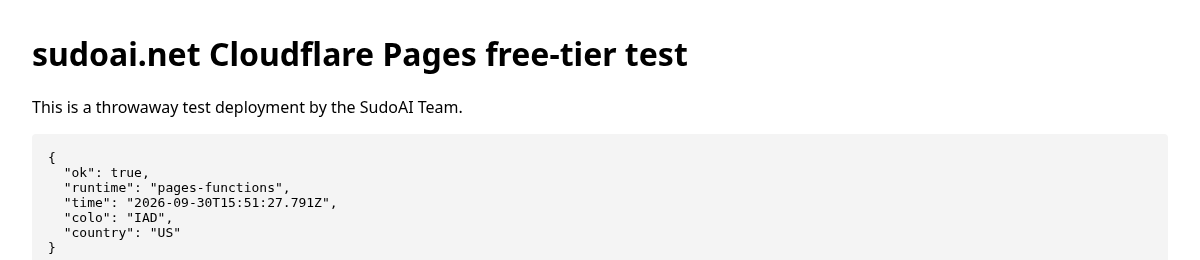
https://sudoai-cf-free-test.pages.dev/ rendering JSON fetched client-side from the /api/hello Pages Function. Captured from our US-East box so the colo shows IAD, at 23:51 SGT on Sep 30, 2026.

/api/hello showing runtime ("pages-functions"), timestamp, and colo (IAD). Captured from our US-East box so the colo shows IAD, at 23:51 SGT on Sep 30, 2026.
Gotchas we hit
We encountered six specific behaviors during this test:
- Node 22 requirement: Wrangler 4.145.0 rejected Node v20.19.2 with:
Wrangler requires at least Node.js v22.0.0. Node 22+ is required. - Cache permission error outside project folder: Running
npx -y wrangler@latest pages project create ...in a folder without apackage.jsonprinted a file-permission error on/node_modules/.cache/wrangler. The project was created regardless; running it again returnedA project with this name already exists [code: 8000002]. Runningnpm init -yfirst prevents this error. - macOS
._*files broke Functions bundler: When extracting files transferred viatarfrom macOS, hidden._hello.jsAppleDouble files were included. The bundler choked on these until all._*files were deleted. - New hash URL failed TLS for ~60 s: Immediately after deployment, the per-deployment hash URL (
https://904f223e.sudoai-cf-free-test.pages.dev) failed withssl/tls alert handshake failurefor approximately one minute. In contrast, the production project URL worked at once. The hash URL returned 200 after ≈60 seconds. -
_headersrules don't touch Function responses: The rule/* X-Robots-Tag: noindexwas applied to static HTML, but was not applied to/api/hello. This matches documentation:_headersonly applies to static asset responses. On preview and hash URLs, Cloudflare automatically addsX-Robots-Tag: noindexto all responses, including Functions. - Unknown paths returned 200 + index.html without a 404.html: Requesting
/nopeon Pages returned HTTP 200 servingindex.html(SPA fallback). Requesting/_headersalso returned 200 withindex.html. Add a404.htmlfile to your build directory if you want real 404s.
Latency from Singapore
Tested from a Mac mini in Singapore at 23:54 SGT on Sep 30, 2026. Sequential curl requests measuring TTFB:
| Endpoint | Type | Requests | Min TTFB | Median TTFB | Max TTFB | Reported colo |
|---|---|---|---|---|---|---|
| Pages Function | /api/hello | 20 | 29 ms | 48 ms | 198 ms | SIN |
| Worker on workers.dev | /api/hello | 20 | 64 ms | 161 ms | 498 ms | HKG / NRT (cf-ray SIN) |
| Pages static HTML | / (index.html) | 10 | 48 ms | 63 ms | 113 ms | not checked |
The Pages Function reported request.cf.colo = SIN, with a median TTFB of 48 ms. For the Worker on workers.dev, median TTFB was 161 ms; while the response header cf-ray showed SIN, the request.cf.colo value inside the Worker reported HKG or NRT across three checks. We did not investigate why this occurred; it is a single run at one time, not a benchmark. A custom domain was not tested.
Strengths
- Fast direct-upload deploys from the CLI
- Static requests are free and unlimited
Limitations
- Functions share the account-wide Workers free quota
- Pages lacks Cron Triggers, Queues, Workers Logs, and gradual rollouts
Free plan limits that matter
Prices and limits checked Sep 30, 2026.
Key limits summarized from official Cloudflare documentation:
| Limit / Feature | Free tier allowance | Details | Docs reference |
|---|---|---|---|
| Git builds | 500 builds / month | 1 concurrent build; 20-min build timeout (not tested by us; applies to Git builds). | Pages limits |
| Files per site | 20,000 files | Maximum total file count per site deployment. | Pages limits |
| File size limit | 25 MiB per file | Maximum size per individual asset file. | Pages limits |
| Custom domains | 100 per project | Per-project custom domain limit (not tested). | Pages limits |
| Projects per account | 100 projects | Maximum distinct Pages projects allowed per account. | Pages limits |
| _headers & _redirects | 100 headers / 2,100 redirects | _headers max 100 rules; _redirects 2,000 static + 100 dynamic rules. | Pages headers |
| Static asset requests | Free and unlimited | Zero per-request fees and unlimited bandwidth for static assets. | Functions pricing |
| Functions requests | 100,000 requests / day | Counts against the Workers free quota (shared across account, resets 00:00 UTC). | Workers pricing |
| CPU execution limit | 10 ms CPU / request | Active CPU limit per request on the Workers Free tier. | Workers limits |
| Paid tier upgrade | Starts at $5 / month | Workers Paid starts at $5/month per account, with 10 million requests included per month (not tested). | Workers pricing |
Pages or Workers static assets?
Workers can now serve a folder of static files, and Cloudflare's docs point new projects there. Here is how they compare based on the official migration guide and our run:
| Capability | Cloudflare Pages | Workers static assets |
|---|---|---|
| Cron Triggers | No | Yes |
| Queue consumers | No | Yes |
| Workers Logs & tail | Real-time logs only (no Workers Logs, Logpush or Tail Workers) | Yes (Workers Logs, Logpush, Tail Workers) |
| Gradual deployments | No | Yes (percentage rollout) |
| Rate limiting | No | Yes |
| Custom domains outside Cloudflare DNS | Yes (CNAME setup) | Not supported |
| Custom branch aliases | Yes (we got a preview-test branch alias with direct upload) | Listed as coming soon |
| _headers & _redirects | _headers confirmed in our test; _redirects per docs (not tested) | _headers confirmed in our test; _redirects per docs (not tested) |
| Default 404 behavior | 200 fallback to index.html (no 404.html) | 404 by default |
Verdict: For a new project with backend plans (cron jobs, queues, microservices, or canary deploys), choose Workers static assets. For a plain static site already on Pages, it is fine to stay.
Sources
Official Cloudflare documentation references checked on September 30, 2026:
Who should not use this
- You need a long-running server, background daemon, or traditional Node.js server container.
- Your requests require heavy CPU computation beyond the free 10 ms CPU limit.
- You want a Postgres-style managed database bundled directly with the hosting platform out of the box (not covered here).
- Your DNS cannot move to Cloudflare and you need Workers-only platform features.
- Teams that require a contractual service level agreement (SLA) or direct phone support (paid tiers, not tested).
Frequently asked questions
Is Cloudflare Pages free for hosting a static website?
Yes. Static asset requests are free and unlimited; Cloudflare's Workers pricing page says there are no egress charges. The main boundaries are 20,000 files per site and 25 MiB maximum size per file.
Do Pages Functions count against a free quota?
Yes. Pages Functions share the account-wide Cloudflare Workers free quota of 100,000 requests per day (resetting at 00:00 UTC) and a 10 ms CPU execution limit per request. We did not hit or test these limits.
Why did the per-deployment hash URL fail with a TLS handshake error at first?
In our run it failed with a TLS handshake alert for about 60 seconds while the production URL worked immediately; our guess is that the certificate for the new hostname was still being set up, but we did not verify that.
Should I choose Cloudflare Pages or Workers static assets for a new project?
Cloudflare now points new web projects to Workers static assets. If you plan to use Cron Triggers, Cloudflare Queues, Workers Logs, or gradual rollouts, pick Workers static assets. If you already run a static site on Pages or need CNAME custom domains outside Cloudflare DNS, staying on Pages is completely fine.