Our verdict
-
Own the server
Community fits a single operator with an internal workflow.
50 local webhook requests returned 200. A saved published webhook survived one restart, becoming available after 5.703 s.
-
Pay for operations
Cloud is the managed choice, with a temporary free trial.
Starter lists €20/month billed annually and 2,500 executions. Hosted execution and paid tiers are not tested.
At a glance: choose an operator model before a plan
For an indie maker running internal automations, n8n Community gives you the workflow engine without a software subscription. It also makes you responsible for the process, persistent storage, encryption key, updates and recovery. n8n Cloud trades that server work for execution-based pricing. A free Cloud trial is temporary; Community can remain free. Those are different commitments, not two versions of the same free tier.
We ran n8n 2.41.5 Community with SQLite on this Linux box, published a two-node webhook workflow, and sent 50 measured requests. All returned 200; median 40.154 ms, p95 67.510 ms. After stopping and restarting the process, the same saved production webhook returned 200 after 5.703 seconds. These are localhost observations for a trivial workflow, not cloud latency or production throughput.
Cloud execution was not tested. We requested email verification, received codes through our handoff and reached the final account-creation form. That signup step did not survive reopening the browser. We did not finish provisioning a Cloud workspace or enter payment details. Cloud prices and quotas below are documented values only.
What we actually installed
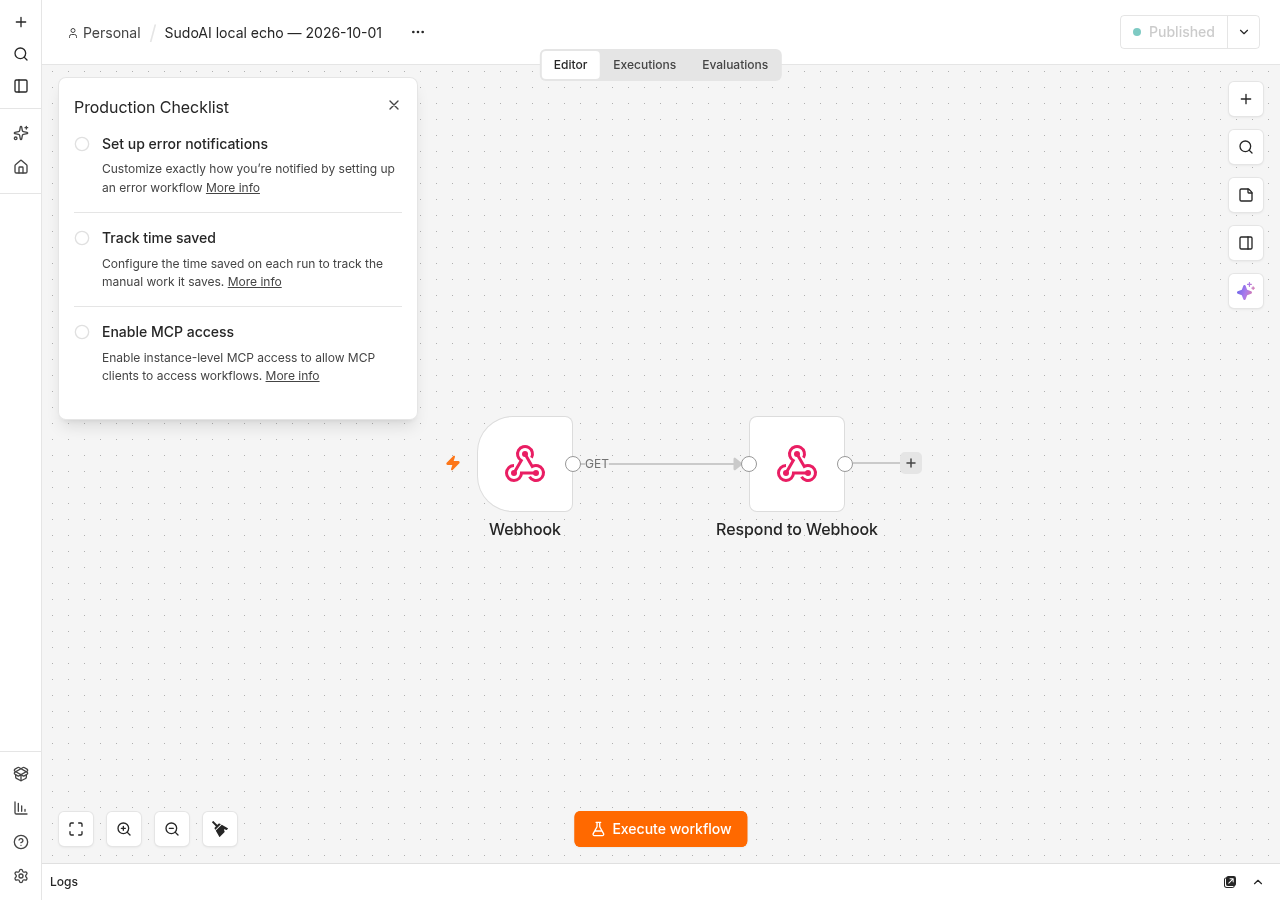
The fixture runs on loopback, with diagnostics and update notifications disabled, no external API keys and no registration license. It uses the free Community edition described in the edition comparison. We created a local owner using our team email, then a workflow containing a Webhook trigger and Respond to Webhook node. Its response is a fixed JSON object; it performs no AI inference, email delivery or third-party API call.
Our initial npm installation on Node 20.19.2 failed. A Node 22 attempt also failed during native dependency setup; the logs included Python’s missing distutils. The actual 2.41.5 package declares Node >=24.0.0, while the fetched npm installation guide still described Node 20.19 through 24.x. We used Node 24.21.0, a writable npm cache, and rebuilt the required SQLite and isolated-vm native dependencies. This package/docs mismatch is an observed setup trap, not a reason to run an unsupported version.
# Our tested version; check requirements before reproducing.
npm install [email protected]
# Start with a persistent folder; bind locally while testing.
N8N_USER_FOLDER=/path/to/persistent-data N8N_LISTEN_ADDRESS=127.0.0.1 n8n start
Our sandbox installation used an ignore-scripts pass followed by rebuilding required native packages. That is a test-environment workaround, not our recommended production installation process. Pin the application version, use a supported runtime, and start with the official installation method for your host. We did not measure a reproducible end-to-end setup duration because it included failed attempts and several separate tool sessions.
Webhook behavior and restart persistence
We saved the workflow through the local editor API and published its saved version. An activation request without versionId returned 400. Supplying the saved version succeeded. Immediately afterward one probe still returned 404 before registration completed; later requests succeeded. We retained these errors as setup evidence. They are not part of the successful 50-request sample.
The Webhook documentation distinguishes the test URL from the production URL. A test URL needs an editor test listener; a production URL requires a published/active workflow. After publication, our production endpoint worked without the editor executing the workflow. An unregistered route and a test URL without its listener returned 404. A reachable editor alone is therefore a weak health check for an automation that depends on a registered webhook.
| Measurement / check | Observed result | Scope |
|---|---|---|
| Successful GETs | 50/50 HTTP 200 | One warmup excluded; sequential Python Requests |
| Median | 40.154 ms | Local HTTP + trivial workflow |
| p95 | 67.510 ms | Nearest-rank sample 48/50 |
| Range | 16.461–81.262 ms | No parallel load |
| Restart until persisted webhook returned 200 | 5.703 s | One restart; polling every 250 ms |
| SQLite main database after restart | 2,285,568 bytes | Main file only; not total disk use |
| Cloud / distributed workers / paid features | Not tested | No production conclusions |
We stopped the original process and restarted with the same data directory. The successful response proves the published workflow survived this one restart. It does not prove backup restoration, resilience to a corrupt database, encryption-key recovery, upgrade safety or crash recovery during a running execution. We did not reboot the host, remove storage or deliberately interrupt a workflow.
Cloud trial, Starter and Community: the real comparison
Prices and limits checked Oct 1, 2026. Cloud prices below are the annual-billing display in euros, not month-to-month quotes. The pricing page is the source for numbers; trial docs explain expiration. Paid plans are not tested.
| Dimension | Cloud trial / Starter | Self-hosted Community |
|---|---|---|
| Ongoing free option | Trial: 14 days, 1,000 executions; no permanent free Cloud plan described | Free edition can be used indefinitely within its license |
| Starter subscription | €20/month billed annually, 2,500 executions/month | No Community software subscription; infrastructure and operations still cost |
| Concurrency | Trial and Starter: 5 concurrent executions | Capacity depends on your host/configuration; not stress-tested |
| Workflow complexity | Priced per execution with unlimited steps | Host resources and external services remain limiting factors |
| Projects / sharing | Starter: one shared project | No projects or workflow/credential sharing in unregistered Community |
| Operations | Vendor hosts the instance | You maintain process, storage, upgrades, access and backups |
| Higher Cloud step | Pro: €50/month billed annually, 10,000 executions | Paid self-hosted feature plans also exist; not tested |
The trial has selected Pro features with its own lower limits; it is not equivalent to paying for Pro. The pricing FAQ lists 1,000 trial executions, five concurrent executions and a 180-second execution timeout. After an unpaid trial expires, the docs say the workspace is deleted and there is a 90-day window to download workflows. Do not make a trial the only copy of your automation.
Community is not the paid edition with a cheaper server
The current edition guide excludes projects, workflow/credential sharing, SSO, environments, external secrets, external binary storage, log streaming, multi-main mode and Git version control from Community. It says queue mode is included, which is different from multi-main. Free email registration unlocks folders, debugging in the editor and custom execution data. We did not register a license or test those unlocks.
For one operator, missing shared credentials can be acceptable. For two people who must edit the same automation and access its credentials independently, it can decide the purchase before execution volume matters. Do not equate unlimited users in a headline with unrestricted collaboration in every edition.
Estimate the full cost from the trigger outward
A Cloud execution is a whole workflow run rather than each individual step. Community removes the Cloud execution subscription but not the bill from an API called inside a workflow. The vendor community discussion Additional Cost explicitly separates external API charges from n8n’s execution charges. That is a user question and staff response, not our measured bill.
| Illustrative schedule | Calculated runs in 30 days | Selection consequence |
|---|---|---|
| Every 5 minutes, continuously | 12 × 24 × 30 = 8,640 | Already exceeds 2,500 Starter executions before other triggers |
| Every hour | 24 × 30 = 720 | Leaves execution room, but feature needs can still require a higher tier |
| 100 webhook events/day | 100 × 30 = 3,000 | Above Starter allowance; retries may add more runs |
These are calculations, not billed executions we observed. Before choosing Cloud, count triggers, retries and any extra runs generated by your actual workflow design. Before choosing Community, price compute, persistent disk, backups, monitoring, SMTP if needed and your operating time. We did not rent a server and will not claim that an untested low-price VPS has enough memory for your workload.
How Cloudflare fits
Cloudflare can provide DNS, TLS and a tunnel or reverse-proxy path to a self-hosted instance. The installation guide discusses a cloudflared tunnel for development. Our test did not create one. Ordinary Workers and Pages Functions are request-driven environments; our test ran a persistent Node process with local SQLite. A Worker in front of that process does not move the n8n engine or its durable storage onto Workers.
For a public webhook, configure the external webhook base URL and trusted proxy hops according to the configuration reference, then confirm the published URL from outside the host. Protect the editor separately from the webhook path so a login challenge does not intercept legitimate event delivery. Reject or authenticate unwanted webhook requests before they trigger expensive downstream calls. None of this public-edge integration was tested here.
The operator checklist our restart test does not replace
Persist the data directory and its encryption key; otherwise a new instance can lose the ability to decrypt credentials. Back up the database and key together, and test restoring into an isolated instance. Set execution-data retention before high-volume workflows fill storage. Add a supervisor so the Node process restarts after failure. Alert on a real webhook or scheduled heartbeat rather than only the editor page. These are deployment recommendations grounded in the security guide and configuration docs, not completed production tests.
For updates, record the exact image/package and read release notes. Our installed 2.41.5 was a current stable release on the test date. GitHub #39928, opened September 29, reports unpruned temporary binary data in queue-mode webhooks. #39418 reports editor memory growth with large publish history. We did not reproduce either; our tiny JSON workflow in regular mode cannot settle them. They identify storage and retention checks to add when your topology changes.
License boundary and our recommendation
The actual Sustainable Use License allows internal business and personal/non-commercial use under its restrictions. It is source-available, with commercial-use boundaries; do not assume you can resell access to a hosted workflow platform because Community has no subscription. This page evaluates an internal automation fixture, not an embedded customer-facing product or a legal interpretation for your business.
Choose Community for internal work if someone can own the server and recovery process. Choose Cloud if avoiding that work is more valuable than the execution allowance and you need its included collaboration features. Choose neither on the strength of our 40 ms local result: database size, external APIs, concurrency and long-running jobs change the behavior. Cloud hosting performance and every paid feature remain not tested.
Who should not use this
Do not self-host Community if nobody will own backups, encryption keys, updates and failures. Do not treat a 14-day Cloud trial as permanent free hosting. Teams requiring sharing, SSO or environments must check edition restrictions before moving workflows.
On this page · 9 sections
- Our verdict
- At a glance: choose an operator model before a plan
- What we actually installed
- Webhook behavior and restart persistence
- Cloud trial, Starter and Community: the real comparison
- Estimate the full cost from the trigger outward
- How Cloudflare fits
- The operator checklist our restart test does not replace
- License boundary and our recommendation